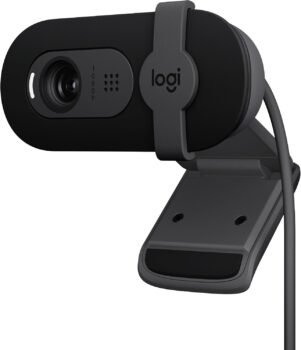
Logitech Brio 101 Full HD 1080p Webcam Review: Best Budget Camera for Streaming & Meetings

Upgrade your video calls and streaming with 1080p resolution, RightLight auto-light correction, and a built-in privacy shutter.
Whether you’re working remotely, attending online classes, or streaming your favorite games, having a reliable HD webcam is essential. The Logitech Brio 101 Full HD 1080p Webcam offers crystal-clear video quality, automatic light balance, and built-in privacy controls at an remarkably affordable price point.
In this comprehensive review, we dive into the key features, performance metrics, and specs to help you decide if the Logitech Brio 101 is the right upgrade for your desktop or laptop setup.
1. Crystal-Clear 1080p Resolution & Auto-Light Balance
The Logitech Brio 101 delivers sharp 1080p Full HD resolution, making a noticeable upgrade over basic laptop webcams. Equipped with RightLight technology, the camera automatically boosts brightness by up to 50% while reducing harsh shadows, ensuring you look crisp and well-lit even in dim environments.
2. Built-in Privacy Shutter & Integrated Microphone
Privacy is key when working from home. The Brio 101 features an integrated physical privacy shutter—a quick slide instantly covers the lens when your video call ends. Additionally, the built-in microphone captures clear audio, allowing you to be heard effortlessly without needing an external headset for quick meetings.
3. Seamless Plug-and-Play Compatibility
Setting up the Brio 101 requires zero tech hassle. Simply connect the USB-A cable to your PC or Mac, and it works instantly across all major video call platforms, including Microsoft Teams, Zoom, Google Meet, and gaming setups.
4. Sustainable & Compact Design
Designed with eco-conscious materials, the Brio 101 is crafted using a minimum of 77% post-consumer recycled plastic. Its sleek, modern, and compact footprint mounts effortlessly onto any monitor or laptop lid.
Key Specifications:
- Brand: Logitech
- Model: Brio 101
- Resolution: 1080p Full HD
- Lighting Correction: RightLight Auto Light Balance
- Microphone: Integrated built-in mic
- Privacy Feature: Physical slide shutter
- Connectivity: USB-A (Plug & Play)
Pros & Cons
What We Like:
- Sharp 1080p video quality with automatic low-light correction.
- Integrated physical privacy shutter for complete peace of mind.
- Instant plug-and-play setup on Windows, Mac, and ChromeOS.
- Compact design made with recycled materials.
Things to Consider:
- Fixed focus lens (optimal for desk-distance video calls).
- Uses a standard USB-A connection (may require an adapter for USB-C-only laptops).
Final Verdict: Is the Logitech Brio 101 Worth It?
If you’re seeking a budget-friendly, high-quality webcam from a trusted tech brand, the Logitech Brio 101 is an absolute standout. Its combination of 1080p clarity, low-light optimization, and built-in privacy protection makes it one of the best value-for-money webcams available today.